We have below SNMP MIB browser , which supoorts both IPv6 and IPv4.
Some of these are licensed product , but free evaluation copy is available for limited time.
1) NuDesign :http://www.ndt-inc.com/SNMP/Download.html
2) WebNMS: http://www.webnms.com/snmputilities/mib-browser.html
3) ByteSphere : http://www.oidview.com/news_mib_browser_to_support_ipv6_with_snmp_traps.html
4) MG-Soft : http://www.mg-soft.si/mgMibBrowserPE-evaluate.html
5) Ireasoning :http://ireasoning.com/mibbrowser.shtml
Monday, 10 December 2012
Which Internet browsers supports link local IPv6 address ?
This draft states of making zone identifier common for all browsers. It is set to expire in May , 2013
http://tools.ietf.org/html/draft-ietf-6man-uri-zoneid-05
A section from this states:
==================================================
Web Browsers
Due to the lack of a standard in this area, web browsers have been inconsistent in providing for ZoneIDs. Many have no support, but there are examples of ad hoc support. For example, older versions of Firefox allowed the use of a ZoneID preceded by an unescaped "%" character, but this was removed for consistency with RFC 3986. As another example, recent versions of Internet Explorer allow use of a ZoneID preceded by a "%" character escaped as "%25", still beyond the
syntax allowed by RFC 3986. This syntax extension is in fact used internally in the Windows operating system and some of its APIs.
This document implies that all browsers should recognise a ZoneID preceded by an escaped "%". In the spirit of "be liberal with what
you accept", we also recommend that URI parsers accept bare "%" signs (i.e., a "%" not followed by two valid hexadecimal characters). This
makes it easy for a user to copy and paste a string such as "fe80::a%en1" from the output of a "ping" command and have it work.
======================================================
1) IE version 7 and above support link local with '%25' added
http://msdn.microsoft.com/en-us/library/windows/desktop/ms740593%28v=vs.85%29.aspx
2) Firefox older version 3.x supported, later it got removed , firefox bug which states this:
https://bugzilla.mozilla.org/show_bug.cgi/attachment.cgi?id=392428&action=edit
3) Chrome bug:
http://code.google.com/p/chromium/issues/detail?id=70762
Could not find information on Opera and Safari.
http://tools.ietf.org/html/draft-ietf-6man-uri-zoneid-05
A section from this states:
==================================================
Web Browsers
Due to the lack of a standard in this area, web browsers have been inconsistent in providing for ZoneIDs. Many have no support, but there are examples of ad hoc support. For example, older versions of Firefox allowed the use of a ZoneID preceded by an unescaped "%" character, but this was removed for consistency with RFC 3986. As another example, recent versions of Internet Explorer allow use of a ZoneID preceded by a "%" character escaped as "%25", still beyond the
syntax allowed by RFC 3986. This syntax extension is in fact used internally in the Windows operating system and some of its APIs.
This document implies that all browsers should recognise a ZoneID preceded by an escaped "%". In the spirit of "be liberal with what
you accept", we also recommend that URI parsers accept bare "%" signs (i.e., a "%" not followed by two valid hexadecimal characters). This
makes it easy for a user to copy and paste a string such as "fe80::a%en1" from the output of a "ping" command and have it work.
======================================================
1) IE version 7 and above support link local with '%25' added
http://msdn.microsoft.com/en-us/library/windows/desktop/ms740593%28v=vs.85%29.aspx
2) Firefox older version 3.x supported, later it got removed , firefox bug which states this:
https://bugzilla.mozilla.org/show_bug.cgi/attachment.cgi?id=392428&action=edit
3) Chrome bug:
http://code.google.com/p/chromium/issues/detail?id=70762
Could not find information on Opera and Safari.

How to enable DHCPv6 route option in ISC-DHCP server
As per information given in link
http://www.isc.org/community/blog/201111/routing-configuration-over-dhcpv6
I tried to enable route prefix option in ISC-DHCP server , the configuration of server is :
vim /etc/dhcp/dhcpv6.conf
===================================================
## NEXT_HOP option with RTPREFIX option included
option dhcp6.next-hop-rt-prefix code 242 = { ip6-address, unsigNed integer 16,un
signed integer 16, unsigned integer 32, unsigned integer 8, unsigned integer 8,
ip6-address };
#
# # This statement configures actual values to be sent
# # RTPREFIX option code = 243, RTPREFIX length = 22
# # lifetime = 9000 seconds
# # route 2001:db8:2::/64
# # metric 1
option dhcp6.next-hop-rt-prefix 2001:db8:270::100:100 243 64 9000 0 1 ::;
=================================================
the configuration of dhcp client :
vim /etc/dhcp/dhcpv6.conf
=========================================
script "/sbin/dhclient-script";
option dhcp6.next-hop-rtprefix code 242 = { ip6-address,unsigned integer 16, uns
igned integer 16,unsigned integer 32,unsigned integer 8, unsigned integer 8, ip6
-address };
# RTPREFIX option
interface "eth1" {
request dhcp6.next-hop-rtprefix,dhcp6.vendor-opts,dhcp6.name-servers;
}
=================================
I can see the prefix 242 in DHCP packets.
http://www.isc.org/community/blog/201111/routing-configuration-over-dhcpv6
I tried to enable route prefix option in ISC-DHCP server , the configuration of server is :
vim /etc/dhcp/dhcpv6.conf
===================================================
## NEXT_HOP option with RTPREFIX option included
option dhcp6.next-hop-rt-prefix code 242 = { ip6-address, unsigNed integer 16,un
signed integer 16, unsigned integer 32, unsigned integer 8, unsigned integer 8,
ip6-address };
#
# # This statement configures actual values to be sent
# # RTPREFIX option code = 243, RTPREFIX length = 22
# # lifetime = 9000 seconds
# # route 2001:db8:2::/64
# # metric 1
option dhcp6.next-hop-rt-prefix 2001:db8:270::100:100 243 64 9000 0 1 ::;
=================================================
the configuration of dhcp client :
vim /etc/dhcp/dhcpv6.conf
=========================================
script "/sbin/dhclient-script";
option dhcp6.next-hop-rtprefix code 242 = { ip6-address,unsigned integer 16, uns
igned integer 16,unsigned integer 32,unsigned integer 8, unsigned integer 8, ip6
-address };
# RTPREFIX option
interface "eth1" {
request dhcp6.next-hop-rtprefix,dhcp6.vendor-opts,dhcp6.name-servers;
}
=================================
I can see the prefix 242 in DHCP packets.
Do DHCPv6 has default gateway option ?
DHCPv6 is defined in RFC 3315.
As such there is no default gateway option in DHCPv6, so we can not assign some specific option for it, to get from DHCP Server.
Actually the default gateway option should come through the Router advertisements (RA)
In windows 7, if we enable DHCP mode, it will accept , the server IP address from DHCPv6 Server and default gateway from RA.
In Fedora core 16, we have to enable mode "Dynamic+Auto" mode to get this behavior.
We have one draft coming up for DHCPv6 route option (http://datatracker.ietf.org/doc/draft-ietf-mif-dhcpv6-route-option/) this will expire in Feb 2013.
Once it comes to RFC status , we will have this option to enable on DHCPv6 servers.
As of now, isc- dhcp server support this option , please see below link for more information.
(http://www.isc.org/community/blog/201111/routing-configuration-over-dhcpv6)
As such there is no default gateway option in DHCPv6, so we can not assign some specific option for it, to get from DHCP Server.
Actually the default gateway option should come through the Router advertisements (RA)
In windows 7, if we enable DHCP mode, it will accept , the server IP address from DHCPv6 Server and default gateway from RA.
In Fedora core 16, we have to enable mode "Dynamic+Auto" mode to get this behavior.
We have one draft coming up for DHCPv6 route option (http://datatracker.ietf.org/doc/draft-ietf-mif-dhcpv6-route-option/) this will expire in Feb 2013.
Once it comes to RFC status , we will have this option to enable on DHCPv6 servers.
As of now, isc- dhcp server support this option , please see below link for more information.
(http://www.isc.org/community/blog/201111/routing-configuration-over-dhcpv6)
Sunday, 25 November 2012
Join Testlink QA group for testing Testlink-Open Source test management tool
Testlink is one of the free open to use test management tool. If you are in QA or in testing and wants to join andy open source project , please do so by joining this group.
These are some schedule for Testlink release:
1. NEXT MAJOR RELEASE => 2.0 and We need HAVE ZERO ISSUE WITH MSSQL and the other DBMS,
2. NEXT MINOR RELEASE/FIX => 1.9.5 probable release date : 2012-12-01, do not expect special work on MSSQL
The testlink is supported on three databases : Postgres, MSSQL and MySQL
Its a huge tool, and to test it, the more people volunteer the better it will be. I am part of this team , and to work with other countries, other mindset, other culture, well, so many things to learn....
Join this group and explore new things, these are few pointers for you to start with :
Visit below links to get associated with it:
http://www.teamst.org/forum/viewtopic.php?f=11&t=7052
https://groups.google.com/forum/?fromgroups=#!forum/testlink-qa
Keep Learning , Keep exploring !!!!
These are some schedule for Testlink release:
1. NEXT MAJOR RELEASE => 2.0 and We need HAVE ZERO ISSUE WITH MSSQL and the other DBMS,
2. NEXT MINOR RELEASE/FIX => 1.9.5 probable release date : 2012-12-01, do not expect special work on MSSQL
The testlink is supported on three databases : Postgres, MSSQL and MySQL
Its a huge tool, and to test it, the more people volunteer the better it will be. I am part of this team , and to work with other countries, other mindset, other culture, well, so many things to learn....
Join this group and explore new things, these are few pointers for you to start with :
Visit below links to get associated with it:
http://www.teamst.org/forum/viewtopic.php?f=11&t=7052
https://groups.google.com/forum/?fromgroups=#!forum/testlink-qa
Keep Learning , Keep exploring !!!!
Sunday, 18 November 2012
BSNL modem IPv6 Issue !!
My BSNL modem has following configuration
| BoardID: | 96338W |
| Software Version: | 1132_061507-3.08L.BSNL_02. |
| Bootloader (CFE) Version: | 1.0.37-8.7 |
| Firmware Version: | WA3002G4-0021.01 |
| Hardware Version: | WA3002G4 1.0 |
| Model Name: | WA3002G4 |
| Wireless Driver Version: | 3.131.35.6.cpe2.0a.s |
IF we enable IPv6 ( which is given in advanced setting )

and reboot the device, the devices wifi goes down. I did not check with Local Ethernet connection , but there seems to be an issue if we enable this option.
When i contacted customer support, they told we do not support IPv6 as of now and, it can not be enabled in the device.
So the question is, why the option is present in the Modem ? It should have been removed.Is testing team is responsible for not raising issue regarding that OR may be they have raised the issue, but internal team did not gave it enough priority ?
You tell me !
Keep breaking , Keep testing !! :-)
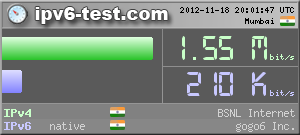
IPV6 Speed Test Results for BSNL connection using IPV6 and IPV4
I ran speed test for my home connection (http://ipv6-test.com/speedtest/) and this is the result :
IPV6 Speed Test results

How to pass Enthusiast Level of Hurricane Electric IPV6 Certification with Windows XP machine and BSNL connection !
Just now passed the third level of HE-IPv6 free certification ( http://ipv6.he.net/certification/cert-main.php).
This level we need to have one IPv6 capable host, one web server and one domain name to map the IPv6 address of the web server.
This all can be done if we use gogoCLIENT and Freenet6 Tunnel services. Both are free services, only one time registration is required.
The gogoClient can be downloaded from http://www.gogo6.com/gogoware/gogoclient
With this client installed in Windows XP machine, we will get our own IPv6 static ip address, which can be tested with http://ipv6-test.com/ , if the IP address is properly assigned or not. Also with its Home access version, we get web server also, with account related domain name.
Use this domain name, and web server configuration , you can create one file which is required to be fetched by HE server.
After this there are few basic questions to be answered, and the Certificate ->

Keep Learning , Keep Sharing !!!!
This level we need to have one IPv6 capable host, one web server and one domain name to map the IPv6 address of the web server.
This all can be done if we use gogoCLIENT and Freenet6 Tunnel services. Both are free services, only one time registration is required.
The gogoClient can be downloaded from http://www.gogo6.com/gogoware/gogoclient
With this client installed in Windows XP machine, we will get our own IPv6 static ip address, which can be tested with http://ipv6-test.com/ , if the IP address is properly assigned or not. Also with its Home access version, we get web server also, with account related domain name.
Use this domain name, and web server configuration , you can create one file which is required to be fetched by HE server.
After this there are few basic questions to be answered, and the Certificate ->
Keep Learning , Keep Sharing !!!!
Friday, 16 November 2012
Windows XP command to enable/diable IPv6 and add/remove default route
To use IPv6 in windows XP machine
1) install ipv6
ipv6 install
2) Set global static IPv6 address
netsh interface ipv6 set address "Local Area connection" 2001:db8:1::2
3) Set default gateway
netsh interface ipv6 add route ::/0 ""Local Area connection" 2001:db8:1::1
To remove IPv6 from Windows XP machine
1) Delete global static IPv6 address
netsh interface ipv6 del address "Local Area connection" 2001:db8:1::2
2) Remove default gateway
netsh interface ipv6 del route ::/0 ""Local Area connection" 2001:db8:1::1
3) Un-install ipv6
ipv6 uninstall
Wednesday, 14 November 2012
How to set hostname in fedora core 16
We have three way to change the hostname in Fedora core 16
1) Vim /etc/hosts, edit and add "test123" in last
127.0.0.1 localhost localhost.localdomain localhost4 localhost4.localdomain4 test123
::1 localhost localhost.localdomain localhost6 localhost6.localdomain6 test123
2) Vim /etc/sysconfig/networks, change hostname
NETWORKING=yes
HOSTNAME=test123
~
3) Use command hostname
set hostname test123
4) Reboot the machine
the machine should display the new hostname "test123"
1) Vim /etc/hosts, edit and add "test123" in last
127.0.0.1 localhost localhost.localdomain localhost4 localhost4.localdomain4 test123
::1 localhost localhost.localdomain localhost6 localhost6.localdomain6 test123
2) Vim /etc/sysconfig/networks, change hostname
NETWORKING=yes
HOSTNAME=test123
~
3) Use command hostname
set hostname test123
4) Reboot the machine
the machine should display the new hostname "test123"
IPv6 Certification Tests for individuals, Hurricane Electric IPv6 Certification
Its quite some time i am using IPv6 in my setup. I gave some presentation on IPv6 also.
I was looking for some certification tests for IPv6 and i cam across this:
For individuals : http://ipv6.he.net/certification/cert-main.php
they have many levels, first level some basic questions, passed all.
For second level we need to do some work . Today i got the second level cleared , the "Explorer" certification.
We need to enable IPv6 on client machine.
In my office we have following setup:
public IP
Internet----------Router/firewall( NAT)-------------PC1(local ip)
The tunnel has to be created with Public IP, using their another free service
http://www.tunnelbroker.net/
you will give : your public IP , and remote IP ( you can select from the list)
it will create the tunnel. Now got to your client machine , I have Fedora core 16 client machine . In website for all type of OS, you can get the commands: For me following is valid :
Linux-router
modprobe ipv6
ip tunnel add he-ipv6 mode sit remote 230.X.X.X local 192.X.X.X ttl 255
ip link set he-ipv6 up
ip addr add 2001:X:X:X::2/64 dev he-ipv6
ip route add ::/0 dev he-ipv6
ip -f inet6 addr
Make sure that the Local IP is the NAT actual Client IP and not the public IP as given in the example configuration of website.
Now ping
ping6 ipv6.google.com -> should work fine
go to http://test-ipv6.com/ and see if they can detect your IPv6 address.
Keep Exploring, Keep Learning !!!
I was looking for some certification tests for IPv6 and i cam across this:
For individuals : http://ipv6.he.net/certification/cert-main.php
they have many levels, first level some basic questions, passed all.
For second level we need to do some work . Today i got the second level cleared , the "Explorer" certification.
We need to enable IPv6 on client machine.
In my office we have following setup:
public IP
Internet----------Router/firewall( NAT)-------------PC1(local ip)
The tunnel has to be created with Public IP, using their another free service
http://www.tunnelbroker.net/
you will give : your public IP , and remote IP ( you can select from the list)
it will create the tunnel. Now got to your client machine , I have Fedora core 16 client machine . In website for all type of OS, you can get the commands: For me following is valid :
Linux-router
modprobe ipv6
ip tunnel add he-ipv6 mode sit remote 230.X.X.X local 192.X.X.X ttl 255
ip link set he-ipv6 up
ip addr add 2001:X:X:X::2/64 dev he-ipv6
ip route add ::/0 dev he-ipv6
ip -f inet6 addr
Make sure that the Local IP is the NAT actual Client IP and not the public IP as given in the example configuration of website.
Now ping
ping6 ipv6.google.com -> should work fine
go to http://test-ipv6.com/ and see if they can detect your IPv6 address.
Keep Exploring, Keep Learning !!!
Friday, 2 November 2012
Dual stack Server configuration for IPv4 and IPV6
Ok, so I have finished working on below things , i hope i posted all configurations in my previous posts.
These servers will serve both IPv4 and IPv6 requests.
1) Tftp Server
2) DHCP Server
3) Free Radius Server
4) Telnet Server
5) FTP Server ( Vsftpd)
6) HTTP server
7) Syslog Server
DNS Server is pending and will do it later.
These servers will serve both IPv4 and IPv6 requests.
1) Tftp Server
2) DHCP Server
3) Free Radius Server
4) Telnet Server
5) FTP Server ( Vsftpd)
6) HTTP server
7) Syslog Server
DNS Server is pending and will do it later.
How to enable DHCP Server in Linux Fedora core 16 for both IPv4 and IPv6
How to enable DHCP Server in Linux Fedora core 16 for both IPv4 and IPv6
We need to run two instances of dhcp to serve IPv4 and IPv6 separately, also we should have two config files for this.
1) yum install dhcp-common
yum install dhcp
2) cd /etc/dhcpd/
Copy sample files
# cp /usr/share/doc/dhcp*/dhcpd.conf.sample dhcpd.conf
#cp /usr/share/doc/dhcp*/dhcpd6.conf.sample dhcpd6.conf
3) configure the subnets for both IPv4 and IPv6 in config files
# vim /etc/dhcp/dhcpd.conf
subnet 192.16.2.0 netmask 255.255.255.0 {
range 192.16.2.10 192.16.2.80;
option routers 192.168.2.1;
option broadcast-address 192.168.2.255;
default-lease-time 600;
max-lease-time 7200;
}
# vim /etc/dhcp/dhcpd6.conf
subnet6 2001:db8:1:0::/64 {
range6 2001:db8:1:0::10 2001:db8:1:0::80;
range6 2001:db8:1:0:: temporary;
prefix6 2001:db8:1:0:: 2001:db8:1:0:: /64;
# Override of the global definitions,
# works only when a resource (address or prefix) is ass
# option dhcp6.name-servers 3ffe:501:ffff:101:200:ff:fe00
}
Save both the files
4) Start the servers
dhcpd -4 -cf /etc/dhcp/dhcpd.conf
dhcpd -6 -d -cf /etc/dhcp/dhcp6.conf
Got error-> "Can't open lease file /usr/local/var/db/dhcp6.lease"
5) vim /etc/dhcp/dhcpd6.conf'
change log path :
dhcpv6-lease-file-name "/var/lib/dhcpd/dhcpd6.leases";
6) Generate blank file
touch /var/lob/dhcpd/dhcpd6.leases
7) Kill the servers, if running and start again the servers
dhcpd -4 -cf /etc/dhcp/dhcpd.conf
dhcpd -6 -d -cf /etc/dhcp/dhcp6.conf
8) Verify by making any Windows 7 Windows PC as IPv6 Client, it should get the ip address from this Server.
Keep Learning, Keep Breaking !!!!
How to enable rsyslog for both IPv4 and IPv6 in Linux fedora core 16
To enable rsyslog please follow these steps:
Syslog Server Fedora Core 16 PC
1) yum install syslog
2) vim /etc/rsyslog.conf
Modify below things
===================
$ModLoad imuxsock # provides support for local system logging (e.g. via logger c
ommand)
$ModLoad imklog # provides kernel logging support (previously done by rklogd)
#$ModLoad immark # provides --MARK-- message capability
# Provides UDP syslog reception
$ModLoad imudp
$UDPServerRun 514
# Provides TCP syslog reception
$ModLoad imtcp
$InputTCPServerRun 514
# This one is the template to generate the log filename dynamically, depending o
n the client's IP address.
$template FILENAME,"/var/log/%fromhost-ip%/syslog.log"
#
# # Log all messages to the dynamically formed file. Now each clients log (192.1
68.1.2, 192.168.1.3,etc...), will be under a separate directory which is formed
by the template FILENAME.
*.* ?FILENAME
=======================
3) start Syslog Server
systemctl restart rsyslog.service
Fedora Core 11 as Syslog Client
1) vim /etc/rsyslog.conf
2) Add the ipv6 server ip address (fe80::1e64:66ff:fec7:8221)
#### MODULES ####
$ModLoad imuxsock.so # provides support for local system lo
logger command)
$ModLoad imklog.so # provides kernel logging support (pre
rklogd)
#$ModLoad immark.so # provides --MARK-- message capability
# Provides UDP syslog reception
#$ModLoad imudp.so
#$UDPServerRun 514
*.* @[fe80::1e64:66ff:fec7:8221]
3) Start syslog
systemctl restart rsyslog.service
Test Server
Make another interface down in client ( not the one through which the server is connected )
ifconfig eth1 down
ifconfig eth1 up
Server -> go to /var/log -> you should see ip address of client directory
go to that directory-> vim syslog.log -> should give details about the interface up and down.
Syslog Server Fedora Core 16 PC
1) yum install syslog
2) vim /etc/rsyslog.conf
Modify below things
===================
$ModLoad imuxsock # provides support for local system logging (e.g. via logger c
ommand)
$ModLoad imklog # provides kernel logging support (previously done by rklogd)
#$ModLoad immark # provides --MARK-- message capability
# Provides UDP syslog reception
$ModLoad imudp
$UDPServerRun 514
# Provides TCP syslog reception
$ModLoad imtcp
$InputTCPServerRun 514
# This one is the template to generate the log filename dynamically, depending o
n the client's IP address.
$template FILENAME,"/var/log/%fromhost-ip%/syslog.log"
#
# # Log all messages to the dynamically formed file. Now each clients log (192.1
68.1.2, 192.168.1.3,etc...), will be under a separate directory which is formed
by the template FILENAME.
*.* ?FILENAME
=======================
3) start Syslog Server
systemctl restart rsyslog.service
Fedora Core 11 as Syslog Client
1) vim /etc/rsyslog.conf
2) Add the ipv6 server ip address (fe80::1e64:66ff:fec7:8221)
#### MODULES ####
$ModLoad imuxsock.so # provides support for local system lo
logger command)
$ModLoad imklog.so # provides kernel logging support (pre
rklogd)
#$ModLoad immark.so # provides --MARK-- message capability
# Provides UDP syslog reception
#$ModLoad imudp.so
#$UDPServerRun 514
*.* @[fe80::1e64:66ff:fec7:8221]
3) Start syslog
systemctl restart rsyslog.service
Test Server
Make another interface down in client ( not the one through which the server is connected )
ifconfig eth1 down
ifconfig eth1 up
Server -> go to /var/log -> you should see ip address of client directory
go to that directory-> vim syslog.log -> should give details about the interface up and down.
How to enable HTTP Server for both IPv4 and IPv6 in Fedora core 16 ( Linux )
Errors and Troubleshooting:
1) vim /etc/httpd/conf/httpd.conf
Verify if you have below line
Listen *:80
this will server both ipv4 and ipv6 address.
2)
In fedora core 16 we have bug , if we start http server
root@localhost ~]# /etc/init.d/httpd start
Starting httpd (via systemctl): Job failed. See system logs and 'systemctl status' for details.
[FAILED]
root@localhost ~]# apachectl start
/usr/sbin/apachectl: line 102: 2028 Segmentation fault $HTTPD $OPTIONS -k $ARGV
To remove this error:
just comment below line vim /etc/httpd/conf.d/perl.conf
#LoadModule perl_module modules/mod_perl.so
3) after this when i restarted the server some error came , not exactly captured at that time but similar to
"hostname nor servname provided, or not known"
for this
vim /etc/httpd/conf/httpd.conf
remove # ( or uncomment below line)
ServerName www.example.com:80
4) restart http service
systemctl start httpd.service
or apachectl start
From another browser try to access apache server, give below URL
http://[2001:db8:1:0:1e6f:65ff:fec5:833d]
You should be able to get fedora test page
1) vim /etc/httpd/conf/httpd.conf
Verify if you have below line
Listen *:80
this will server both ipv4 and ipv6 address.
2)
In fedora core 16 we have bug , if we start http server
root@localhost ~]# /etc/init.d/httpd start
Starting httpd (via systemctl): Job failed. See system logs and 'systemctl status' for details.
[FAILED]
root@localhost ~]# apachectl start
/usr/sbin/apachectl: line 102: 2028 Segmentation fault $HTTPD $OPTIONS -k $ARGV
To remove this error:
just comment below line vim /etc/httpd/conf.d/perl.conf
#LoadModule perl_module modules/mod_perl.so
3) after this when i restarted the server some error came , not exactly captured at that time but similar to
"hostname nor servname provided, or not known"
for this
vim /etc/httpd/conf/httpd.conf
remove # ( or uncomment below line)
ServerName www.example.com:80
4) restart http service
systemctl start httpd.service
or apachectl start
From another browser try to access apache server, give below URL
http://[2001:db8:1:0:1e6f:65ff:fec5:833d]
You should be able to get fedora test page
How to enable free radius server for both IPV4 and IPV6 in Fedora core 16
How to enable free radius server for both IPV4 and IPV6
1) Download free radius tar file from their website (lets assume name as freeradius)
2) tar xvzf freeradius.tar.gz
3) cd freeradius
4) ./configure
5) make
6) make install
7) The radius server will get install in directory raddb
8) vim /usr/local/etc/raddb/radiusd.conf
ADD below lines if not present
listen {
type = auth
ipaddr = *
port = 0
}
listen {
ipaddr = *
port = 0
type = acct
}
listen {
ipv6addr = ::
port = 0
type = auth
}
listen {
ipv6addr = ::
port = 0
type = acct
}
save the file
9) radiusd -X
The server should accept request from both Ipv4 and IPv6 clients.
1) Download free radius tar file from their website (lets assume name as freeradius)
2) tar xvzf freeradius.tar.gz
3) cd freeradius
4) ./configure
5) make
6) make install
7) The radius server will get install in directory raddb
8) vim /usr/local/etc/raddb/radiusd.conf
ADD below lines if not present
listen {
type = auth
ipaddr = *
port = 0
}
listen {
ipaddr = *
port = 0
type = acct
}
listen {
ipv6addr = ::
port = 0
type = auth
}
listen {
ipv6addr = ::
port = 0
type = acct
}
save the file
9) radiusd -X
The server should accept request from both Ipv4 and IPv6 clients.
How to enable telnet server for both IPv4 and IPv6 in Fedora core 16!
To enable Telnet Server please follow below steps :
Fedora core 16 Server as telnet server:
1) yum install telnet-server
2) vim /etc/xinetd.d/telnet
service telnet
{
disable = no
flags = REUSE
socket_type = stream
wait = no
user = root
server = /usr/sbin/in.telnetd
log_on_failure += USERID
flags = IPv6
}
Change disable to "no" and add "flags=IPv6"
3) systemctl restart xinetd.service
Fedora Core 11 Client
telnet ipv6address%interface-name
Telnet clients supports ipv6 but if you do not specify interface-name in the command , "invalid argument" error will be displayed in clients, when you try to telnet.
telnet fe80::1e63:45ff:fec4:8823%eth1
and
telnet ipv4-address
telnet 192.167.23.2
Both command should work fine.
Fedora core 16 Server as telnet server:
1) yum install telnet-server
2) vim /etc/xinetd.d/telnet
service telnet
{
disable = no
flags = REUSE
socket_type = stream
wait = no
user = root
server = /usr/sbin/in.telnetd
log_on_failure += USERID
flags = IPv6
}
Change disable to "no" and add "flags=IPv6"
3) systemctl restart xinetd.service
Fedora Core 11 Client
telnet ipv6address%interface-name
Telnet clients supports ipv6 but if you do not specify interface-name in the command , "invalid argument" error will be displayed in clients, when you try to telnet.
telnet fe80::1e63:45ff:fec4:8823%eth1
and
telnet ipv4-address
telnet 192.167.23.2
Both command should work fine.
Wednesday, 31 October 2012
How to enable vsftpd( ftp server) for IPV6 and IPv4
1) yum install vsftpd
2) vim /etc/vsftpd/vsftpd.conf
change :
listen=NO
listen_ipv6= YES
For anonymous upload/dwnload
anon_mkdir_write_enable= YES
anon_other_write_enable= YES
anon_upload_enable= YES
3) service vsftpd start
4) Default path for upload /download directory
/var/ftp/
5) The Linux native client (ftp) does not support IPv6, so use "lftp" to test the server.
6) Windows 7/ Windows 2008 Server ftp client will work so you can use "ftp ipv4/ipv6" command.
2) vim /etc/vsftpd/vsftpd.conf
change :
listen=NO
listen_ipv6= YES
For anonymous upload/dwnload
anon_mkdir_write_enable= YES
anon_other_write_enable= YES
anon_upload_enable= YES
3) service vsftpd start
4) Default path for upload /download directory
/var/ftp/
5) The Linux native client (ftp) does not support IPv6, so use "lftp" to test the server.
6) Windows 7/ Windows 2008 Server ftp client will work so you can use "ftp ipv4/ipv6" command.
How to enable TFTP server in Fedora core 16 for IPv6 and IPv4
1) Install Tftp Server
yum install tftp-server
2) "Flag IPv6" support both IPv4 and IPv6 communication
Vi /etc/xinetd.d/tftp
Change -> disable = no
flags = IPv6
3) systemctl restart xinetd.service
4) Verify if the server is running
chkconfig tftp
it should display "enabled"
5) The default directory is /var/lib/tftproot
Troubleshooting
If you run command
tftp ipv6-address , and in wireshark you observe "unreachable Administratively Prohibited"
this means that the firewall is blocking the packets , disable SELinux,iptables and ip6tables
Commands to disable Firewall
chkconfig iptables off
chkconfig ip6tables off
vim /etc/selinux/config
change-> disabled
Reboot the PC
How to enable TFTP server in Fedora core 16 for IPv6 and IPv4
1) Install Tftp Server
yum install tftp-server
2) "Flag IPv6" support both IPv4 and IPv6 communication
Vi /etc/xinetd.d/tftp
Change -> disable = no
flags = IPv6
3) systemctl restart xinetd.service
4) Verify if the server is running
chkconfig tftp
it should display "enabled"
5) The default directory is /var/lib/tftproot
Troubleshooting
If you run command
tftp ipv6-address , and in wireshark you observe "unreachable Administratively Prohibited"
this means that the firewall is blocking the packets , disable SELinux,iptables and ip6tables
Commands to disable Firewall
chkconfig iptables off
chkconfig ip6tables off
vim /etc/selinux/config
change-> disabled
Reboot the PC
Subscribe to:
Posts (Atom)